Medical Alert Systems: How They Work and What to Compare
A medical alert system, sometimes called a personal emergency response system (PERS), lets an older adult call for help by pressing a button worn on the body. For families of someone who lives alone, it can be one part of a safety plan. It is not a guarantee: the device has to be worn, charged and connected, and someone has to answer. This guide explains how medical alert systems work, the types on the market and what to ask before you sign up.

Who may benefit, and who to talk to first
Falls are the situation most families have in mind. According to CDC data, over a quarter of people 65 and older fall in a given year, that fewer than half tell their doctor, and that one fall doubles the chance of another. Its falls data page adds that many people who fall become afraid of falling and cut back on activity, which can leave them weaker.
The National Institute on Aging (NIA) lists emergency response systems as one way to prepare for a fall: a button on a necklace or bracelet that calls for help, a feature some smartwatches also have. In its aging-in-place guidance, NIA describes a worn electronic monitor that alerts emergency personnel when a person falls, gets lost or needs urgent medical help.
A medical alert system may help someone who:
- lives alone or spends long stretches of the day alone;
- has fallen before, or has conditions or medicines that affect balance;
- might not be able to reach a phone after a fall or sudden illness;
- is starting to get lost outside the home (a GPS model may matter here).
A device does not lower the risk of falling by itself. NIA advises telling the doctor about any fall, even without pain, because it can reveal a new health problem or a medicine issue. A physical therapist can assess balance, and the doctor or pharmacist can review medicines. Talk to them alongside any equipment decision.
How we wrote this guide
We have not subscribed to, worn or tested any medical alert system or monitoring service. No company paid to appear here, there are no affiliate links, and we do not rank providers. The guide draws on the CDC, NIA, the Federal Communications Commission (FCC), Medicare.gov, Medicaid.gov, the Administration for Community Living and one manufacturer's public support page used as a neutral example. All were read on November 3, 2026; where an official site refused our plain request, we read a dated archive.org copy and say so in the sources.
Types of medical alert system compared
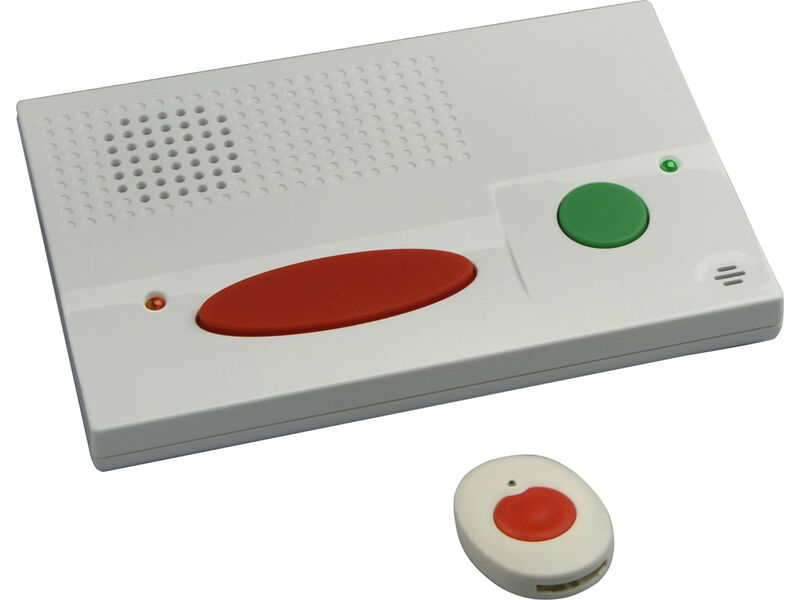
Most systems share three pieces: a wearable help button, a way to send the alarm (a home base unit, a cellular connection or a paired phone), and someone who receives it, either a staffed response center or a list of family contacts. There is no weight capacity to compare; the specifications that matter are range, battery life, water resistance and how the device connects.
| Type | How it calls for help | Where it works | Things to check |
|---|---|---|---|
| In-home system | Pendant or wristband signals a base unit with a speaker, which connects over a landline, internet phone or cellular link | Inside the home and a set distance around it | Button range to the farthest room and the yard; backup battery in the base unit |
| Mobile (GPS) unit | A wearable with its own cellular connection and speaker | Anywhere the network reaches | Which cellular network it uses, how often it needs charging, whether location is shared |
| Fall-detection add-on | Sensors in the wearable try to detect a fall and start a call if the person does not cancel | Depends on the base or mobile unit | False alarms, and the fact that not every fall is detected |
| Smartwatch with emergency calling | Watch places an emergency call, and on some models detects hard falls | Where the watch or paired phone has service | Daily charging; settings must be switched on and set up correctly |
| Monitored service | Calls go to a staffed response center that assesses and sends help | Any of the above | Center hours, average answer time, languages, how contacts are reached |
| Unmonitored (self-dial) device | Calls family contacts or 911 directly | Any of the above | What happens if no contact answers; no ongoing service fee, but no operator either |
Fall detection deserves a closer look. Apple's support page for its watch, as one documented example, says the watch "cannot detect all falls," may treat high-impact activity as a fall, calls emergency services automatically only after the wearer has been still for about a minute, and needs a cellular, Wi-Fi or satellite connection plus wrist detection switched on. Ask any provider for the same level of detail about its own sensor.
How to choose a medical alert system: fit, features and safety
- Will it actually be worn? Let the person try the pendant, wristband and clip styles. Comfort and looks affect whether it goes on every morning.
- Can it be worn in the shower? Many families want the button worn in the bathroom too. Check the maker's water-resistance rating on the specification sheet.
- Can they press the button? Arthritis, weakness or tremor can make small buttons hard. Test it together.
- Can they hear the speaker? With hearing loss, test the two-way voice from across the room. See our hearing aids guide if this is a concern.
- How does it connect? The FCC warned during the 3G network retirements that some medical devices and home security systems relied on 3G and could lose service; it advised asking the monitoring company how a device connects. Ask which network a cellular unit uses and whether the provider will replace it if that network changes.
- What happens in a power or internet outage? The FCC says internet phone (VoIP) service may stop working during a power outage or when the connection fails, and suggests backup power, a traditional line or a wireless phone as a backup. Ask how long the base unit runs on its battery.
- Who answers, and how do responders get in? Ask whether the center can reach a neighbor with a key, and how the provider handles a locked door.
Contract questions before you sign: monthly fee and what it includes; whether equipment is bought or leased; activation, shipping or cancellation fees; how long the contract runs; whether a trial period lets you return it; how to test the system; and how to update the contact list. Get the answers in writing.
Costs, Medicare, Medicaid and other help
Prices. None of the official sources we read give typical prices, so we do not quote any. Ask for the full yearly cost, including equipment, monitoring and any fall-detection fee.
Original Medicare. To count as durable medical equipment on Medicare.gov's terms, an item must hold up to repeated use, serve a medical purpose, generally be of use only to people who are ill or injured, be used at home and have a lifespan of three years or more. We found no Medicare.gov page listing medical alert systems as covered, so do not assume Original Medicare will pay. If coverage matters, ask Medicare before buying.
Medicare Advantage. Medicare.gov notes these plans may cover some extras that Original Medicare does not. Ask the plan whether a personal emergency response system is among them.
Medicaid. Medicaid.gov explains that states design home and community-based services (HCBS) waivers to help people who would otherwise need institutional care get services at home, and that services and eligibility vary by state and target group. Ask your state Medicaid office whether any of its waivers include a PERS.
State AT programs. Every state has an assistive technology program, supported by the Administration for Community Living, that offers device demonstration, short-term loans, reuse and financing activities. The AT3 Center keeps the state directory.
Limitations and safety
- It works only if worn. A pendant on the nightstand cannot help after a fall in the hallway.
- It works only with power and signal. Base units need electricity and a working line; mobile units need charge and network coverage. Outages and dead spots are real limits.
- The person has to decide to press it. Agree ahead of time that any fall or scare is a reason to call, and practice a test call together.
- Fall detection misses falls and makes false calls. Treat it as a backup, not a replacement for pressing the button.
- It does not prevent falls. NIA's falls guidance points to exercise, medicine review, eye and hearing checks, safer footwear and home changes for that.
If an alert goes to emergency services by mistake, Apple's support page advises staying on the line and telling the responder you do not need help, rather than hanging up. That is sensible practice with any device.
How a caregiver can help with a medical alert system
Most of the value comes from routine. A family member or companion caregiver can:
- Make wearing it automatic. Put the pendant on with morning clothes and leave it by the bed at night only if the maker says it is safe to wear in bed.
- Keep it charged. Choose one fixed charging time and place, and check the battery light on each visit.
- Test it monthly, or as often as the provider suggests, by pressing the button and telling the operator it is a test.
- Keep contacts current. Update phone numbers, the medicine list and doctor details with the provider whenever they change.
- Walk the range. Press the button from the garden, garage and bathroom to confirm the base unit hears it.
- Agree a daily check-in. NIA suggests arranging daily contact with a family member or friend and carrying a charged phone. A device plus a routine call is stronger than either alone.
An alert button works best alongside fall-prevention steps: our guide on choosing a walker covers walking aids, and a mobility assistance caregiver can steady someone during walks and transfers. For visits that combine company with an extra pair of eyes on how a parent is doing, see companion care. CaregiverConnect charges nothing to post the job and leaves the hiring to you; since we perform no vetting, go through our safety checklist before anyone starts. You can find a caregiver near you today.
Frequently asked questions
How does a medical alert system work?
The person presses a button on a pendant, wristband or watch. The device connects through a base unit, a cellular network or a paired phone to a staffed response center or to chosen contacts, who talk to the person and send help if needed.
Does Medicare pay for medical alert systems?
We found no Medicare.gov page listing them as covered durable medical equipment, so do not count on Original Medicare. Some Medicare Advantage plans and some state Medicaid waiver programs may help; ask them directly.
Do medical alert systems detect falls automatically?
Some offer fall detection as a feature or add-on. Manufacturer documentation, for example Apple's support page, states that devices cannot detect every fall and can mistake other movement for a fall. Pressing the button is still the main way to call.
Will a medical alert system work during a power outage?
It depends on the device. The FCC says internet phone service may stop during a power or internet outage. Ask how long the base unit runs on battery, and keep a charged mobile phone as a backup.
Do medical alert systems work outside the home?
In-home units only reach a set distance from the base. Mobile units with their own cellular connection, and some smartwatches, work wherever they have network coverage.
What questions should I ask a medical alert company?
Ask about total yearly cost, contract length, cancellation and equipment return terms, which network it uses, battery life, water resistance, response center hours, how often to test, and how responders will get into the home.
Sources
- CDC, Older Adult Falls Data and facts (read via web.archive.org copy of 2026-10-19)
- NIA, Falls and Fractures in Older Adults: Causes and Prevention (read via web.archive.org copy of 2026-07-30)
- NIA, Aging in Place: Growing Older at Home (read via web.archive.org copy of 2026-08-01)
- FCC, Plan Ahead for Phase Out of 3G Cellular Networks and Service (read via web.archive.org copy of 2026-10-20)
- FCC, VoIP and 911 Service (read via web.archive.org copy of 2026-10-04)
- Medicare.gov, Durable medical equipment (DME) coverage (archived copy, 2026-10-23)
- Medicare.gov, What's not covered by Original Medicare
- Medicaid.gov, Home and Community-Based Services 1915(c) (read via web.archive.org copy of 2026-10-09)
- ACL, Assistive Technology (State AT programs)
- AT3 Center, State AT program directory
- Apple Support, Use Fall Detection with Apple Watch (manufacturer page, neutral example only)
Ready to find a caregiver?
Post what you need for free and see which caregivers near you apply.